in CLI tool how to pack only contents, not a whole library?
Submitted by papi Jo on Wed, 12/24/2025 - 23:21

Forums:
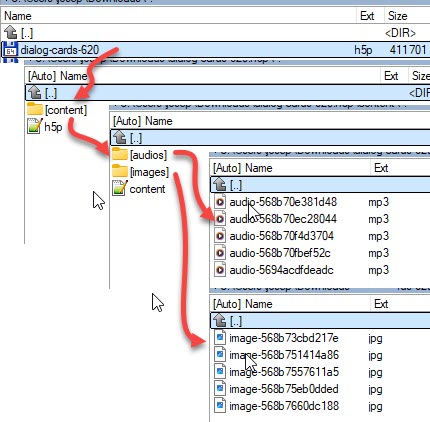
On https://h5p.org/content-types-and-applications when we click the Re-use button on any of the example contents, we get the "contents" only, without the actual libraries. For instance, clicking on the Re-use button at https://h5p.org/dialog-cards#example=619 we get this kind of package:
In the CLI development folder on my local computer, the H5P contents that are created reside (for example) in "C:\my_first_h5p_environment\content". Each content looks like this:
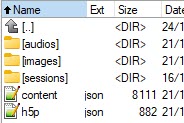
What I want is a CLI command to pack the h5p.json and content.json files and the audio and images folders to a minimal h5p contents zipped file (excluding of the sessions folder which is not needed).
Any ideas anyone?
Joseph 'papi Jo'

otacke
Thu, 12/25/2025 - 23:44
Permalink
The H5P integration for
The H5P integration for Drupal was customized on h5p.org to not store libraries.
The H5P cli tool does not feature this.
Should be pretty simple though to write yourself a shell script to remove everything from the H5P file that you don't want (even on Windows). Then you could strip the regular file exports.
papi Jo
Wed, 09/09/2026 - 16:19
Permalink
posted a PR on the h5p cli GitHub repo
Add --mini and --output options to export - #201
otacke
Wed, 09/09/2026 - 19:52
Permalink
Yup, noticed. I see any repo
Yup, noticed. I see any repo change. No attention grabbing, please ;-)
papi Jo
Thu, 09/10/2026 - 11:52
Permalink
ok
ok