The Launch of H5P OER Hub
Exciting news for the H5P Community!
The H5P OER Hub is now available to everyone, and you can enable it across most of our products and integrations!
What is the H5P OER Hub?
The hub is a shared library for open educational resources (OER) made with H5P.
With the H5P OER Hub, you can access interactive content created by authors from around the world, and you can also share your own content so it can be reused and create value for learners everywhere. This is one of the core features of the H5P community, and we are happy to be able to facilitate the sharing and reuse of interactive content for education.
You will be able to access the OER Hub on H5P.com with all available plans, as well as through the officially supported Moodle plugin maintained by H5P Group. We are also working on bringing the H5P OER Hub to our WordPress plugin and the Drupal 11 plugin. Once we have an update on the scheduled release for these two additional plugins, we will share updated communication.
Different ways of using the OER Hub:
Discover & Use
- Browse a growing collection of high-quality, free teaching and learning materials created by educators worldwide. Find ready-to-use resources that can save time and inspire your teaching.
Share & Contribute
- Upload your own interactive content and make it available for peers around the world. Your contributions help others build on your work, reduce duplication, and create richer learning experiences for students everywhere.
Connect & Collaborate
- Engage with the community, exchange ideas, and co-create resources. The Hub is designed to support collaboration, so we can all learn from each other and improve teaching together.
How can I get started?
The first thing you need to do is enable the OER Hub for your organization or account. There are two ways to do this:
- Enable it for accessing interactive content only
- Enable it for both accessing and sharing interactive content
Below is information on how to enable the OER Hub for both use cases.
Access Content from the OER Hub
To access interactive content from the OER Hub, go to your organization or account settings and enable the OER Hub.
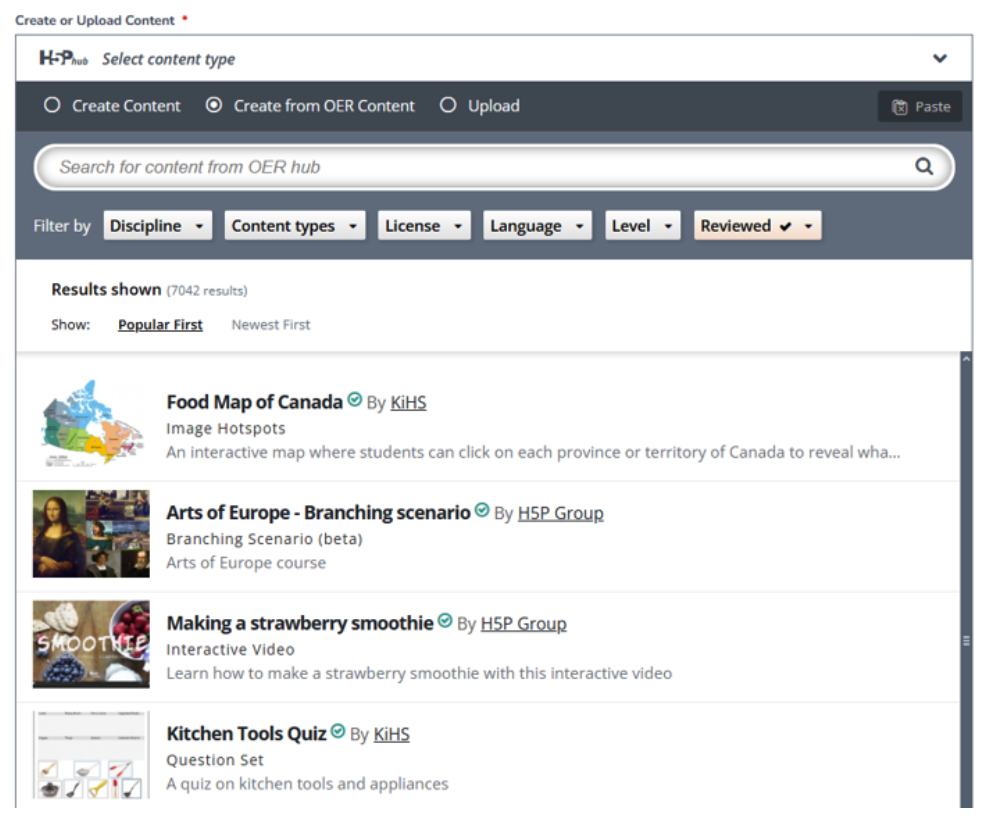
Once enabled, you will see the “Create from OER Content” option when creating new content. This option allows you to reuse existing content from the H5P OER Hub.
When you reuse content from the OER Hub, H5P will automatically attribute the content to the original author.
If you do not see the “Create from OER Content” option, make sure the OER Hub is enabled in your organization or account settings.
Sharing Your Content on the OER Hub
If you want to both access interactive content from the OER Hub and share your own content, you need to register your organization or account with the OER Hub.
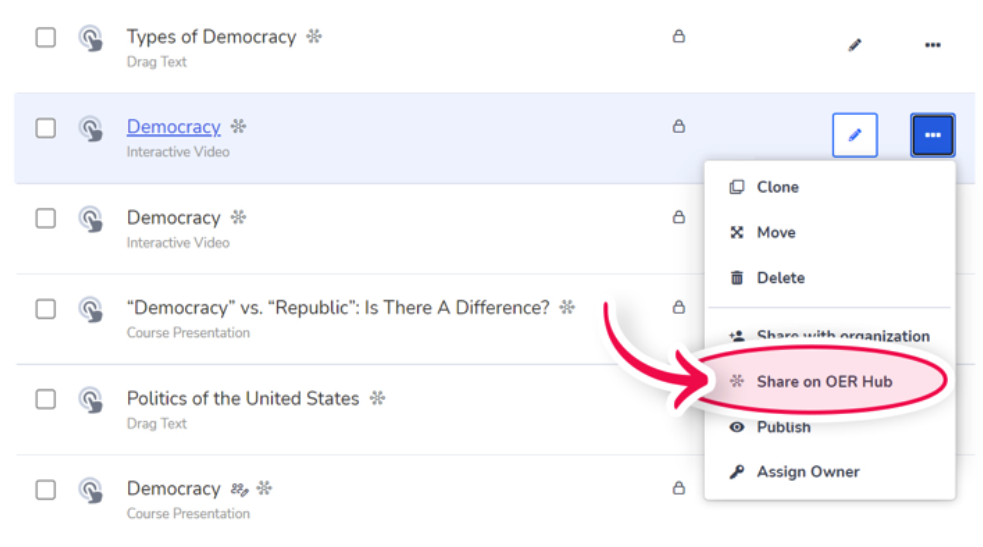
Below are the instructions on how to register.
For H5P.com, you need to register your organization with the OER Hub. This can be done in the Organization Details settings under Manage Organization.
Once registered, you can start sharing your content and access all existing interactive content available in the H5P OER Hub.
Moodle Plugin
For the Moodle plugin, log in as an administrator and go to:
Dashboard → Site administration → Plugins → Activity modules → H5P → H5P Settings
Once there, click Register, fill in the form, and submit it.
After registration, you can start sharing your content and access all existing interactive content in the H5P OER Hub.
FAQ
Q: Is the OER Hub enabled automatically for organizations or accounts?
A: No. The OER Hub is disabled by default and will not appear in your organization or account until you have enabled it.
Q: What products or integrations will the OER Hub be available for?
A: Initially, the OER Hub will be launched for some official integrations and services managed by H5P Group, including:
* H5P.com (available to all plans)
* The Moodle plugin managed by H5P Group
We are also working on bringing the H5P OER Hub to the WordPress plugin and the Drupal 11 plugin. Once we have updates on the scheduled release for these plugins, we will share updated communication.
Q: Is the OER Hub a free feature?
A: Yes! There is no additional cost for using the OER Hub.
Q: Is content on the OER Hub verified or approved?
A: Yes. All content is verified and approved before it is shared on the OER Hub.
Q: If I have registered on the OER Hub, can I unregister?
A: Yes. Contact the H5P support team at [email protected] and they will assist you with unregistering.
We look forward to seeing how you'll use the H5P OER Hub. Share your work with the community here.
Kelly - Community Manager
