Issue with H5P Presentation Editing – Different Layout in Editor vs Final View
Submitted by zubel.k on Thu, 01/15/2026 - 14:59
Forums:
Description:
I’m working on a presentation in H5P (within Moodle) and encountered a major issue that significantly slows down content editing.
What’s the problem?
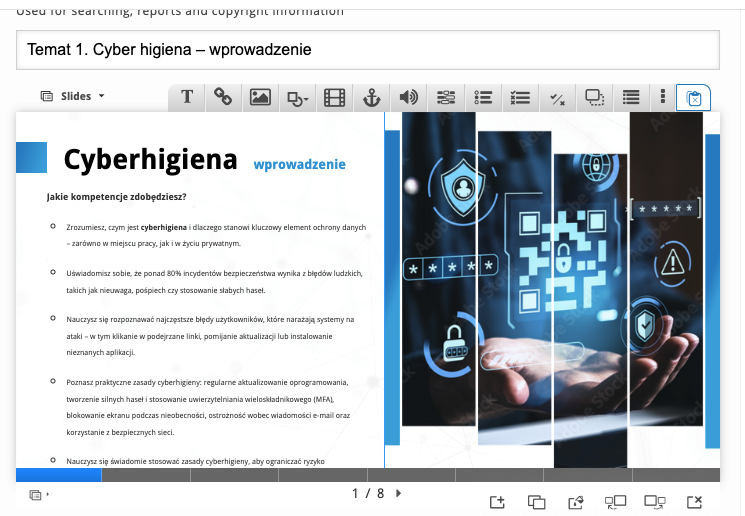
The H5P editor tries to be responsive, but in practice, the layout during editing looks very different from the final presentation view:
- In the editor view, the slide is compressed horizontally, and the text and images appear smaller or distorted. This makes it hard to judge spacing and alignment.
- In the final view, the slide is full-width with correct proportions (16:9), and the content looks completely different compared to the editor.
Effect:
When editing, the text often seems to overflow or not fit properly, while in the final view it looks sparse and well-spaced. This forces me to arrange content “blindly,” which takes much longer than it should.
Example:
- Editor view: text is cramped, images look squeezed.
- Final view: everything is stretched and aligned correctly.
Question:
Is there any way in Moodle/H5P to:
- Disable responsiveness in the editor?
- Force fixed proportions (e.g., 16:9) for both editing and final view?
- Make the editor preview match the final presentation layout (maybe via CSS or configuration)?
Any advice or workaround would be greatly appreciated, because this discrepancy makes content creation very inefficient.