Issue with Drag the Words target areas, words end up in wrong target area

Drag the words has issue especially with longer words and if/when target areas are close to each others.
When words are dragged it highlights all the target areas which word touches at the moment, and drops the word to an area which borders were crossed first, not the area which word/mouse currently hovers over.
E.g. in example image both ot the top left target areas are highlighted because the word touches both of them at the same time (dashed line around activated targets) when user dragged the word from the right side to the left side of the content over multiple targets.

When word is then realeased it ends up in the target area on right, despite mouse cursor and word itself was visually hovering mostly over the leftmost target area, which was the intended target for the word drop.
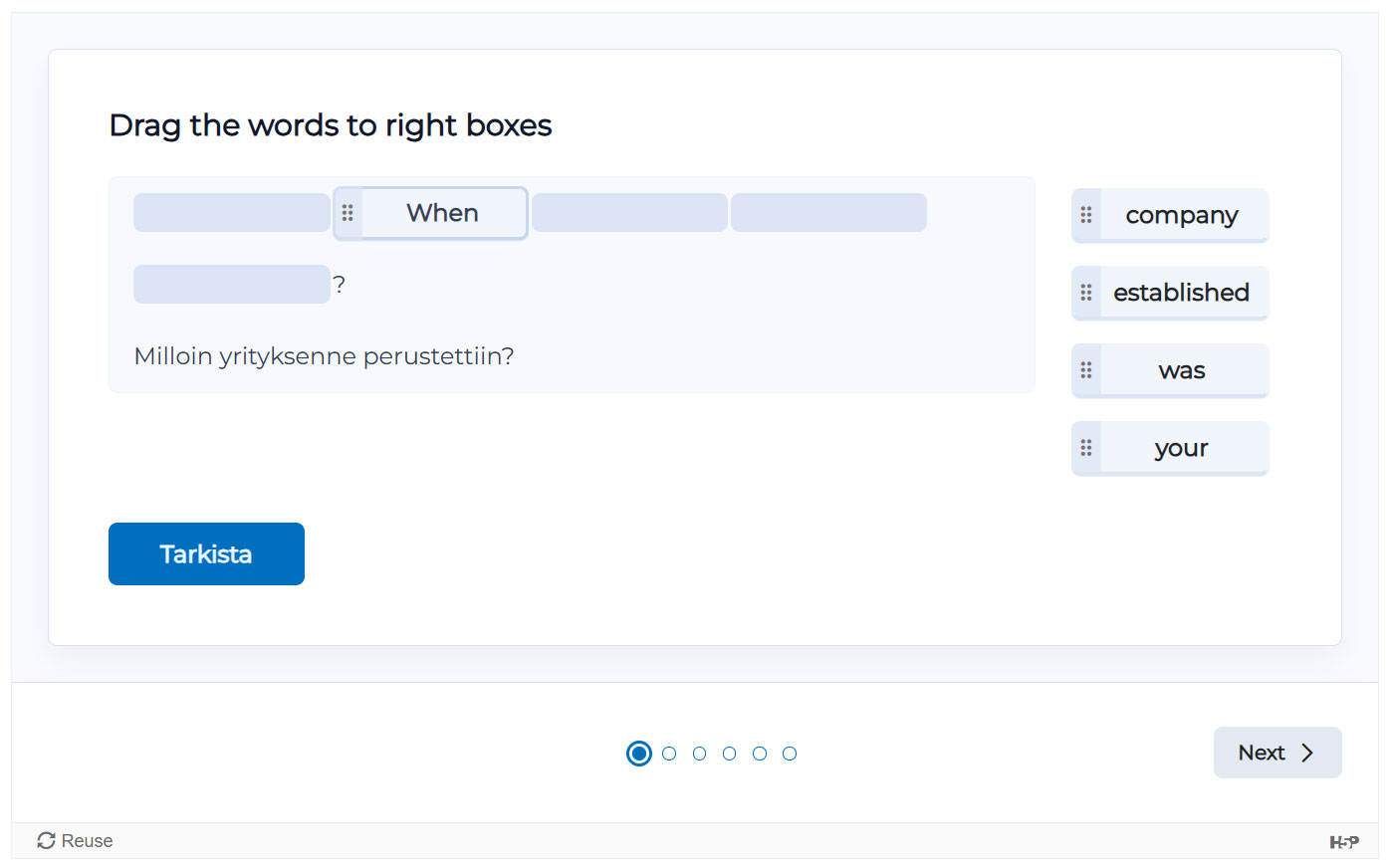
What seems to cause the issue is that when dragging the word over multiple targets, it actives all the target areas it touches and seems to lock on to target area which the word crossed first if the word is still touching that area when user releases the word.
Word then goes to the first target are it crossed, even if the word and cursor are clearly moved over the other target area.
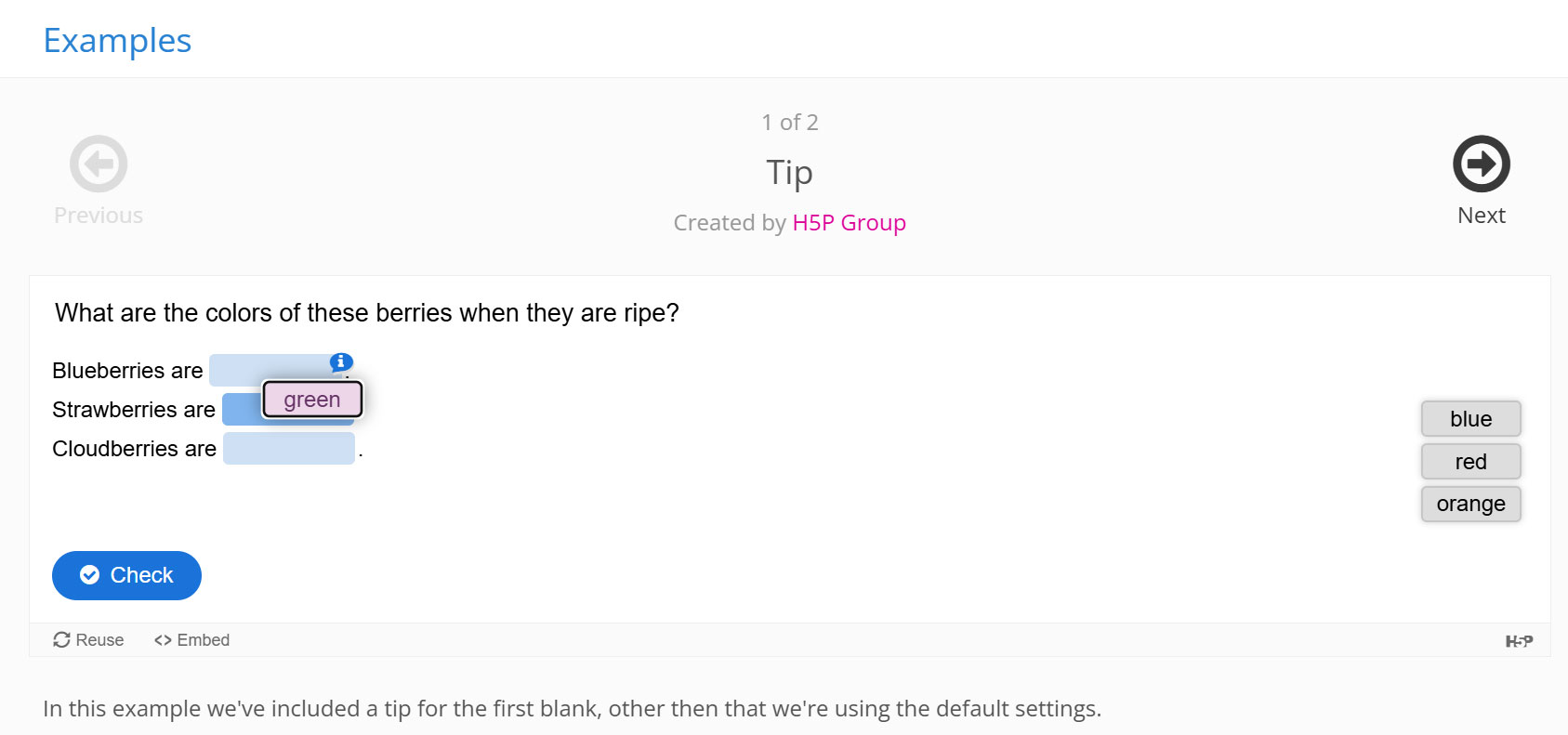
In older versions, e.g. example here https://h5p.org/drag-the-words this issue did not exist because even when the word was hovering over multiple targets, only one of the areas became active targets.
E.g. here word 'green' is visible touching both Blueberry and Strawberry areas, but only Strawberry is visibly activated and when word is realeased it goes to highlighted area even if user moved it there over the Blueberry area.
Especially in tight spaces (many targets close each others) and with long words (easy to touch multiple targets at once) content can be almost impossible to do, unless user figures out that words can also be moved by first clicking the word and then the intented target.
But that functionality is not clearly explained or widely known and people by defaut try to drag words in content type called "drag the words".
Content needs fixing so that only one indicaded target is activated at one time, same way it worked before.
Tested in
Moodle 4.5.13 (Build: 20260810)
mod_hvp 1.28.2 (2026062500)
Drag the Words (1.10.50)


BV52
Thu, 09/03/2026 - 01:39
Permalink
Hi Shilbu,Drag Words will
Hi Shilbu,
Drag Words will drop the draggables into the drop zone where the mouse is pointed. So please let your students know to make sure that they point the mouse icon into the box they want to drop the draggable.
-BV
Shilbu
Mon, 09/07/2026 - 11:55
Permalink
Hi BV52, thanks for reply
I have to disagree. Yes, Drag the words works correctly e.g. here https://h5p.org/drag-the-words but based of look and feel it seems h5p.org has older version of the content type.
When I download the example and upload it in Moodle, it updates and content gets new look and feel and issue arise with the newer version.
As seen in this screenshot, same example but buttons and elements look a bit different than what in seen on h5p.org and when dragging the word it also visibly activates two target areas at once (dashed line around the targets) which does not happen in public example.
When I release the word it goes to the first area it touched if both areas are activated. In this example spacing is quite generous so target is easier to hit without touching other areas, but in real life examples lot of questions have tighter spacing and it's easy to brush over more than one target at once.
I tried downloading this very example to h5p.org but when uploading the file it informs:
"Validating h5p package failed."
"Missing required library H5P.Components 1.0"
So mismatch in library versions which are not updated with the h5p file (which is understandable).
But I added example file in this post. Yes, demo version on this site works as it should, a version with update looks not as well.
BV52
Mon, 09/07/2026 - 17:29
Permalink
Hi Shilbu,From my tests I can
Hi Shilbu,
From my tests I can only reproduce the issue if the mouse pointer is not on top of any of the boxes. However, I can see how this can affect how the content will be used and may confuse students. I report this to our development team so that they may find a solution. Just to confirm you have an H5P.com license and using Moodle as your LMS?
-BV
otacke
Tue, 09/08/2026 - 00:57
Permalink
I have not tried to reproduce
I have not tried to reproduce this, but I remember HFP-3847 (https://h5ptechnology.atlassian.net/browse/HFP-3847) which seems to describe the same issue. It was fixed in the legacy version. I assume that this is a regression that was introduced with the new end user design.
Shilbu
Tue, 09/08/2026 - 13:37
Permalink
Hi BV52,
Thank you. Worst situation is with content which has lots of target areas close to each others and other issue this causes that it easily knocks words of the areas user has already populated before. User tries to add a new word and it replaces older word already in place.
Moodle is the LMS this has been tested with, I do not think we have separate H5P.com lisense. Does it affect this issue?
papi Jo
Tue, 09/08/2026 - 23:04
Permalink
Hi!
I agree that this is an annoying problem. I have fixed it in my own 'papi Jo' version of the Drag the Words activity, as you can see on the attached video captures. Find out more on my WordPress h5p test site here: https://www.rezeau.org/wp-h5p/dtw-documentation-en
-----------
BV52
Wed, 09/09/2026 - 19:25
Permalink
Hi Everyone,Thank you for the
Hi Everyone,
Thank you for the input. I have reported this to our Development team but I do not have a timeline when we can prioritize this.
-BV