Problems when using accents in crossword
Submitted by Victorvillela on Sat, 02/08/2025 - 08:59
Forums:
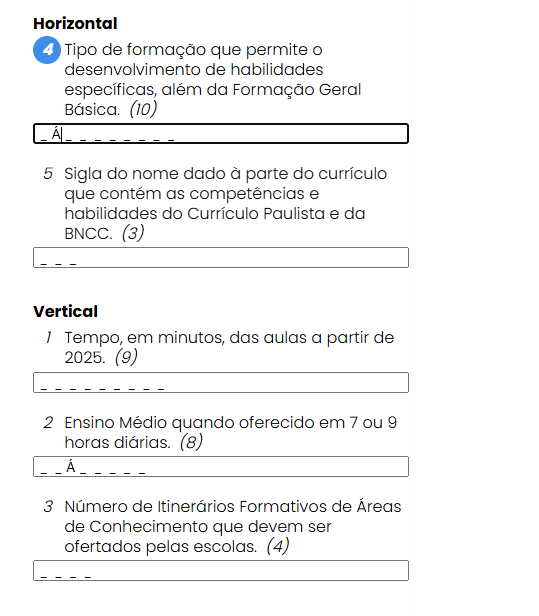
"When I try to type accents, for example, A + ~ (to get ã), the system is interpreting this as two keys being pressed simultaneously, when in fact, you are just trying to press the accent key followed by the letter. This misinterpretation can happen for various reasons.
To explain what happens when typing these characters: Composite key (e.g., acute accent or tilde): On Brazilian keyboards, accent keys (like the tilde ~, acute accent ´, or circumflex ^) are called composite keys. They need to be pressed first, and then you press the letter you want to apply the accent to. For example: Is this behavior of receiving two keys instead of one something that can be fixed?"
Attachments:


otacke
Sun, 02/09/2025 - 14:36
Permalink
This is a known issue (see
This is a known issue (see https://github.com/otacke/h5p-crossword/issues/40
Unfortunately, there are different ways that symbols can be represented, different ways to enter them and different handling across different devices. Investigating and handling all this is was beyond the original contract with the sponsor who funded, the content type. So far neither have I found the free time that I'd need to invest into this issue nor received a pull request from someone else who created a solution.
Jeroen van Dinther
Mon, 10/12/2026 - 17:05
Permalink
It depends on where you type
I am aware of the fact that this is a known issue, but maybe it helps to point out that it depends on where you type your answers.
When the cursor is inside the grid, the character that I type in combination with Alt Gr land in the correct place. When typing with the cursor inside the input field near the question it first inserts an empty space inside the grid before sending the desired character. I realize the input is processed in both cases e.g. for á to Á or é to É, but suspect it is a timing issue. Maybe the event listeners on the clue input field must be updated to respect the compositionstart and compositionend events, or debounce the synchronization so it doesn't break international keyboard inputs.
I hope someone can find the time to look into this.
Jeroen van Dinther
Mon, 10/12/2026 - 17:07
Permalink
It depends on where you type
I am aware of the fact that this is a known issue, but maybe it helps to point out that it depends on where you type your answers.
When the cursor is inside the grid, the character that I type in combination with Alt Gr land in the correct place. When typing with the cursor inside the input field near the question it first inserts an empty space inside the grid before sending the desired character. I realize the input is processed in both cases e.g. for á to Á or é to É, but suspect it is a timing issue. Maybe the event listeners on the clue input field must be updated to respect the compositionstart and compositionend events, or debounce the synchronization so it doesn't break international keyboard inputs.
I hope someone can find the time to look into this. I am using WordPress, Windows 10 and Google Chrome.