Issue with spaces when using a iPad scriber
Submitted by kasianowak on Wed, 08/12/2026 - 22:13
Forums:
The client has reported the following issue:
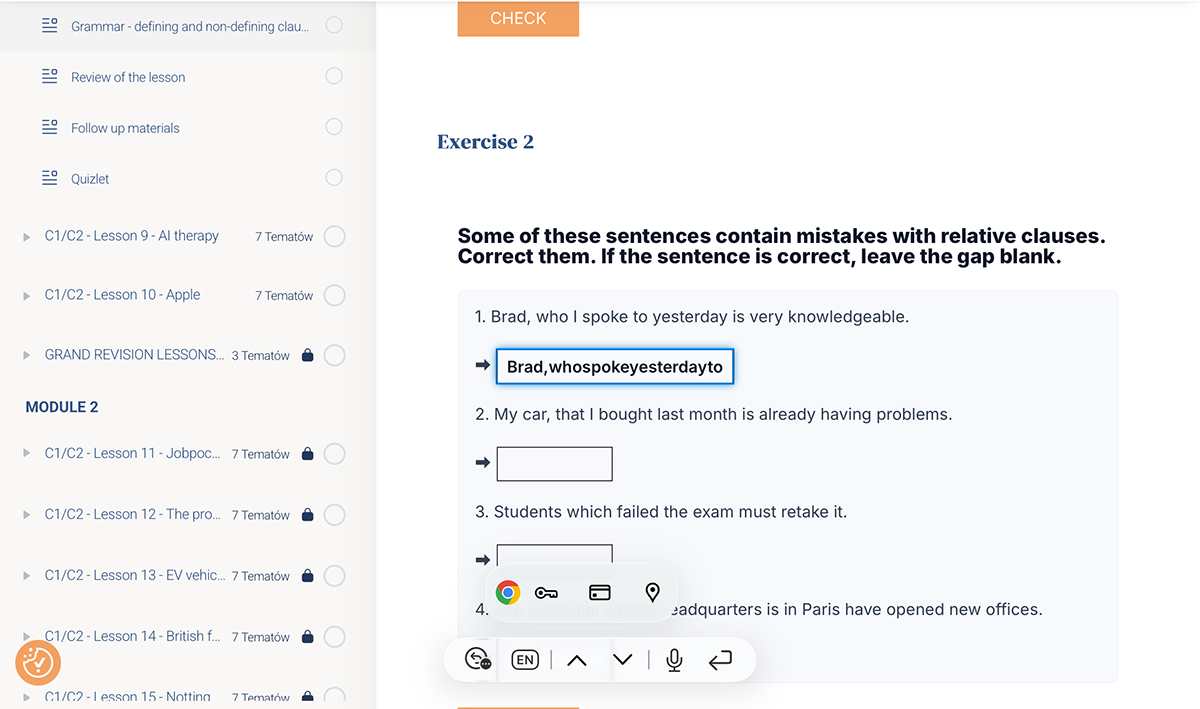
"For the past few weeks, I have been experiencing a problem with the platform – when entering text using a iPad scriber, spaces are not inserted automatically.
Please see the example in the attached screenshot. This does not appear to be a hardware or software update issue, as spaces are inserted automatically in every other application.
The same problem occurs in both Safari and Chrome, on both an iPad and a Windows laptop.
Would it be possible to investigate and fix this issue?"
Could I please count on your help with this issue?
Attachments:

Content types:

otacke
Wed, 08/19/2026 - 21:49
Permalink
What is an iPad Scriber???
What is an iPad Scriber??? Might be hard to reproduce without knowing what that even is.
But maybe that's not important. The "spellcheck" attribute is set to "false" on the input fields for good reasons, and I'd assume that this Scriber requires "spellcheck" to work. But that is a guess.