YouTube videos incorrectly positioned/resized in H5P Interactive Book
EDIT: sorry feel free to delete/archive this, i posted this before this was solved https://moodle.atlassian.net/browse/MDL-89517
Hi,
We are experiencing an issue with YouTube videos embedded in H5P Interactive Books in Moodle.
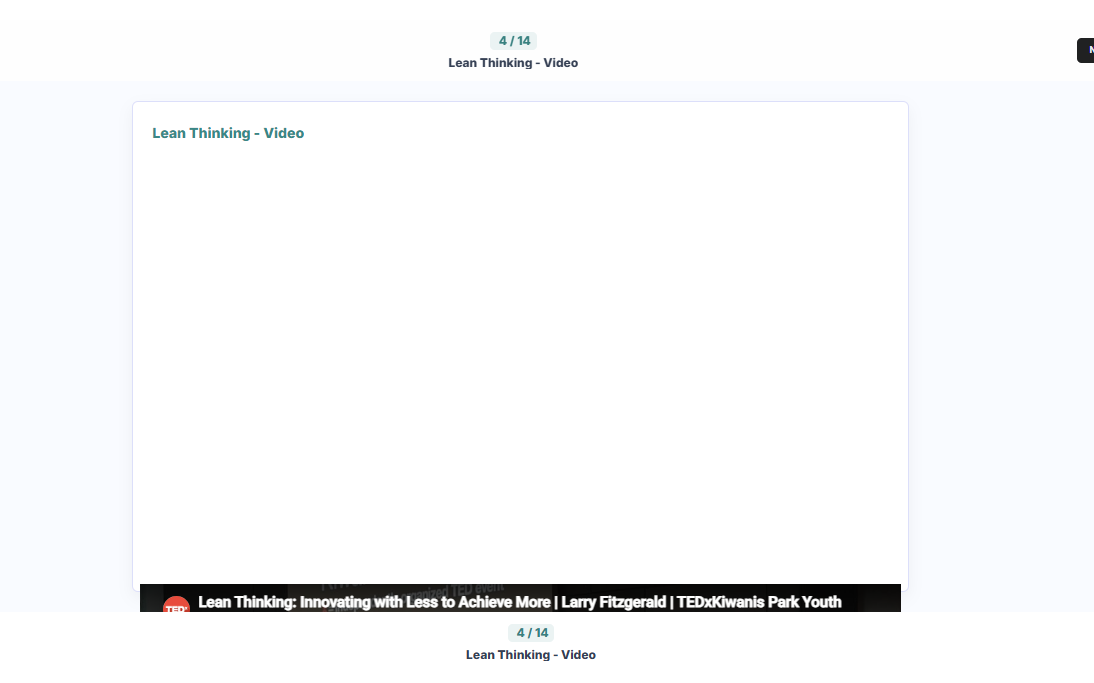
The videos appear to load, but the video area is being given an incorrect height, leaving a large blank space and pushing the YouTube player to the bottom of the page.
This is happening across multiple existing Interactive Books and can also be reproduced in newly created test content. Multiple of our students using different laptops and computers across Australia have reported the same issue.
We are currently using:
- Moodle 4.5.13
- H5P Interactive Book 1.15
- Chrome on desktop
Moodle was updated to 4.5.13 approximately one week ago, but YouTube videos continued to display correctly after the update. This issue only started within the last two days.
The YouTube URLs themselves work normally when opened directly on YouTube, and uploaded video files display correctly within H5P. The issue appears to be specific to YouTube-embedded videos.
To reproduce, add a YouTube video to an Interactive Book and view the page containing the video.
Screenshot attached showing the issue.
Thanks in advance! Let me know if i can provide any more info.
- Diana


BV52
Thu, 08/27/2026 - 18:18
Permalink
Hi dianananana,If you are
Hi dianananana,
If you are still encountering this issue and you are self-hosting your contents please make sure that you are using the latest version of Interactive Video.
On the other hand if you are hosting your contents in H5P.com please provide the URL of the content so that we can check.
-BV
saidhouria0101
Mon, 08/31/2026 - 22:00
Permalink
URL de la vidéo youtub
Bonjour
Moi aussi j'ai le même problème, je voulais insérer une vidéo statique , j'obtiens une page blanche?
BV52
Tue, 09/01/2026 - 18:29
Permalink
Hi,Where are you creating
Hi,
Where are you creating your contents? Do you have the latest version of Interactive Video?
-BV
davidarmstrong
Wed, 09/23/2026 - 13:55
Permalink
YouTube videos incorrectly positioned
Good morning.
Same error, as reported, and updating to the latest version of:
Interactive Book, Interactive Video (1.28.35) and Video did not correct the issue.
I am open to other ideas such as custom CSS in Additional HTML on Moodle.
Moodle version: 4.5.12
BV52
Thu, 09/24/2026 - 19:40
Permalink
Hi davidarmstrong,Do you have
Hi davidarmstrong,
Do you have a sample page and sample content that we can test?
-BV