Label parts of an image with text
Submitted by rfarlow on Tue, 10/23/2018 - 18:50
Forums:
I would like my students to be able to label different parts of an image with entered text. For example, I would like to upload a picture of various intersecting shapes and lines (see attached) and have the students enter in the measurement of the angles I want them to determine (i.e. Angles 1-6 in the attached image). Perhaps H5P can call this "hotspot labelling"?
Attachments:


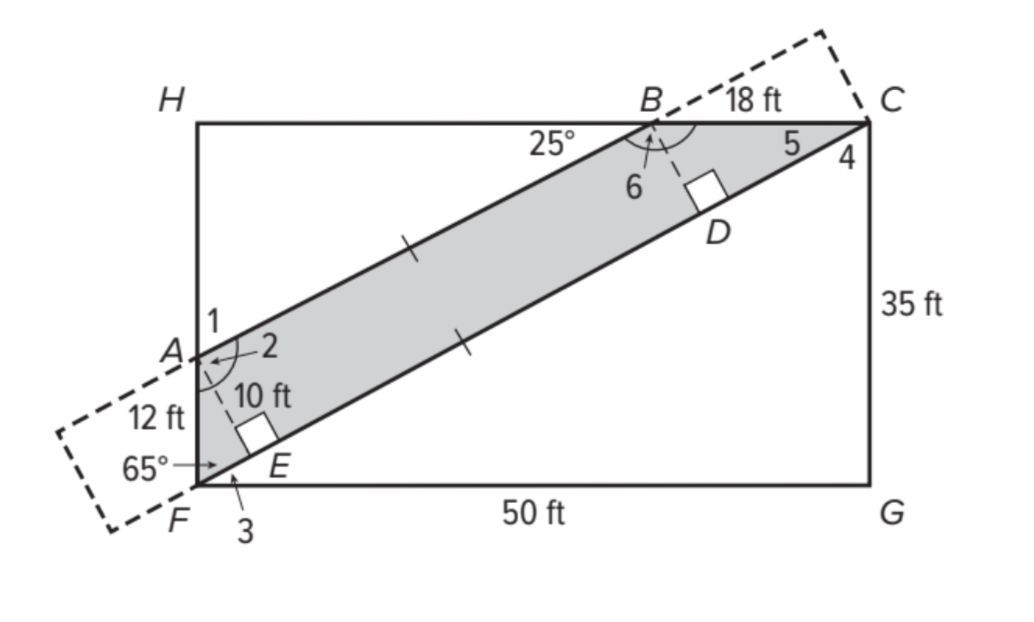
BV52
Wed, 10/24/2018 - 03:59
Permalink
Hi rfarlow,Thanks a lot for
Hi rfarlow,
Thanks a lot for contributing your ideas on how to make H5P better! We’re now working on something called the H5P supporter program allowing the H5P community to vote for and fund the top voted H5P features. Also there are developers in the community who every now and then works on a feature they find interesting or useful.
In the meantime you can use Course Presentation with the image as a background and Fill in the Blanks as the space for the answer. I'm not sure though how to insert the "degree" sign.
-BV52
betht
Sun, 04/16/2023 - 17:30
Permalink
Labelling an image
Hi BV52,
I am trying to use course presenation with the image as a background and Fill in the Blank for the space for the label but don't seem to be able to fill in multiple locations. Have you been able to do this? Any tips?
Thanks.
Betht
specialboys76
Sun, 04/19/2026 - 22:22
Permalink
H5P-Label-the-Image
It's been 8 years but it's finally here:
https://github.com/HessamAyoubi/H5P-Label-the-Image
otacke
Mon, 05/04/2026 - 20:13
Permalink
Good job! But somebody beat
Good job! But somebody beat you by a couple of weeks, see: https://www.olivertacke.de/labs/2026/02/26/h5p-hamburg-community-event-premiere-h5p-checklist-and-h5p-labelexercise/
What I noticed:
You may find some more hints at https://snordian.de/2023/04/29/how-to-review-h5p-content-types/
otacke
Thu, 05/21/2026 - 10:16
Permalink
I'd like to amend my previous
I'd like to amend my previous comment.
I cannot recommend to use all the resources found in the repository to build a library. The repository contains (and should not, as mentioned before) other libraries, too: H5PEditor.VerticalTabs and H5PEditor.ImageCoordinateSelector. The latter was patched, yet bears the original machine name and thus pretends to be the official library. Those action can cause havoc!!! Cmp. https://www.olivertacke.de/labs/2024/05/02/a-short-voluntary-h5p-fire-de...
The overall structure of the repo and approaches chosen therein (including trusting AI blindly, it seems, and accepting nonsense changes), unfortunately, let me come to the conclusion that this content type is not fit to be used in production.