YouTube video displays black in H5P Interactive Video, but audio and interactions work
YouTube video displays black in H5P Interactive Video, but audio and interactions work
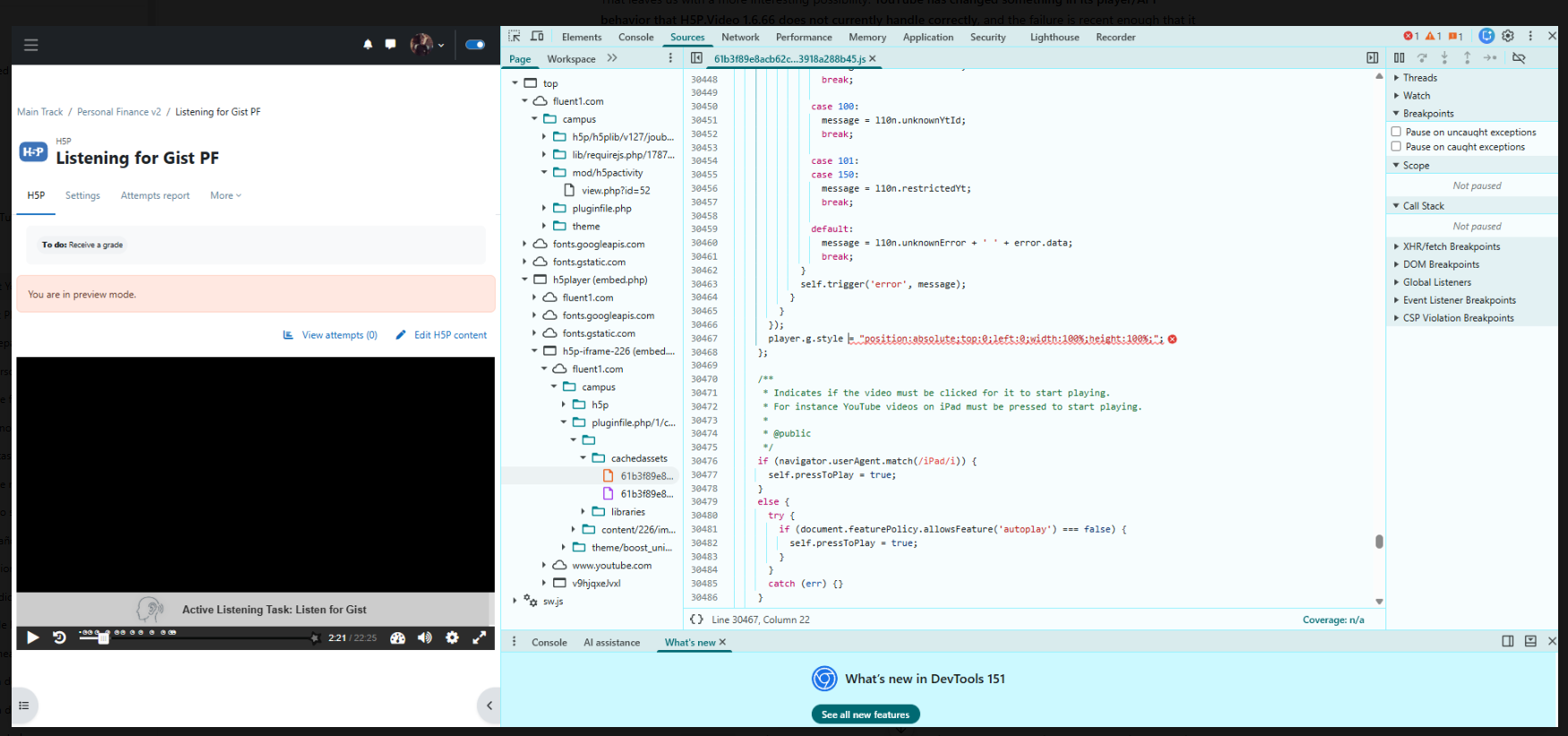
Since August 19, 2026, YouTube videos used in H5P Interactive Video on my Moodle site have stopped displaying the visual/video component.
The video area is completely black. However:
- YouTube audio plays normally.
- The H5P timeline works normally.
- H5P interactions appear and function normally.
- Seeking/play/pause work.
- The video duration is detected correctly.
- Vimeo videos used in H5P Interactive Video work normally.
These same H5P Interactive Video activities were working correctly previously.
Environment
- Moodle 4.5.2
- H5P Interactive Video versions installed: 1.26.35 and 1.27.9
- H5P.Video library: 1.6.66
- Moodle native H5P / Content Bank
Testing performed
I have reproduced the issue:
- In Chrome
- In Edge
- In Chrome Incognito
- On a separate mobile device using Chrome
I also created a completely new H5P Interactive Video using a YouTube video and get the same result.
I created a normal Moodle Page and embedded a YouTube video there. The YouTube video plays and displays normally.
Therefore the problem appears specific to YouTube playback through H5P rather than YouTube embedding generally on the Moodle site.
Using a Vimeo video as the source in H5P Interactive Video also works correctly.
Browser console error
When the affected H5P Interactive Video loads, the browser console reports:
Uncaught TypeError: Cannot set properties of undefined (setting 'style')
The error occurs in the YouTube player initialization path:
at create (...)at window.onYouTubeIframeAPIReady (...)at www-widgetapi.js:185:153at www-widgetapi.js:185:203
DevTools identifies the failing H5P JavaScript statement as:
player.g.style = "position:absolute;top:0;left:0;width:100%;height:100%;";
At this point, player.g appears to be undefined.
The console also reports:
Failed to execute 'postMessage' on 'DOMWindow': The target origin provided ('https://www.youtube.com') does not match the recipient window's origin ('https://fluent1.com').
Summary
The problem appears to be specific to the interaction between H5P's video player and the YouTube IFrame API:
Normal YouTube embed in Moodle: works
Vimeo in H5P Interactive Video: works
YouTube in H5P Interactive Video: audio works, but video is black
Could this be a compatibility issue between H5P.Video 1.6.66 and a recent change in the YouTube IFrame Player API?
I would be happy to provide screenshots, console output, or perform additional diagnostic tests if useful.


steveford
Thu, 08/27/2026 - 10:43
Permalink
H5P Course Presentation
YouTube videos in embedded in H5P course presentation are not loading at all in our Moodle installation, again a very recent change. We have plugin version 1.28. I understand that people are experiencing the same issue in Lumi Education.
otacke
Thu, 08/27/2026 - 12:29
Permalink
That problem was fixed the
That problem was fixed the very day it occured. Just ensure that you are using H5P Framework 1.28 supplied by Moodle HQ for their own H5P integration, update InteractiveVideo to the latest version and you're good.
bchartier
Thu, 08/27/2026 - 13:54
Permalink
Same bug
Hi,
In the code of youtube :
player.g.style = "position:absolute;top:0;left:0;width:100%;height:100%;";
YouTube change the name pointant of "g" in the build 2.20260824.01.00, so player.g is undefined → TypeError: Cannot set properties of undefined (setting 'style')
Bertrand
bchartier
Thu, 08/27/2026 - 13:55
Permalink
Same bug
Hi,
In the code of youtube :
player.g.style = "position:absolute;top:0;left:0;width:100%;height:100%;";
YouTube change the name pointant of "g" in the build 2.20260824.01.00, so player.g is undefined → TypeError: Cannot set properties of undefined (setting 'style')
Bertrand
PreventionREP
Thu, 08/27/2026 - 14:08
Permalink
I am having the same issue.
I am having the same issue. It seems to be common. Is it a setting in Jetpack, or something else? Support would be appreciated.
otacke
Fri, 08/28/2026 - 15:32
Permalink
Just update Interactive Video
Just update Interactive Video and you're good. Isn't it common practice to first check whether an update is already available before raising a bug report?
AndrewPickles
Mon, 08/31/2026 - 10:31
Permalink
We have updated to 1.28.37
We have updated to 1.28.37 and the problem persists
otacke
Wed, 09/02/2026 - 00:25
Permalink
How do you expect someone
How do you expect someone will be able to help you with that piece of info alone?
AndrewPickles
Mon, 08/31/2026 - 10:41
Permalink
Updated and same problem
We have updated to 1.28 and the problem persists
AndrewPickles
Thu, 09/03/2026 - 15:36
Permalink
Something useful
You in a previous post suggested updating to 1.28, I was merely confirming that having done that, the problem remains. As you seem unable to contribute anything more useful to these conversations, perhaps it would be better if you left it to others who are at least able to be courteous and constructive. Thank you.
BV52
Thu, 09/03/2026 - 20:58
Permalink
Hi Andrew,Can you please
Hi Andrew,
Can you please confirm which platform are you using? Also can you get a screenshot of the libraries for H5P, specifically for Interactive video.
-BV
otacke
Fri, 09/04/2026 - 10:00
Permalink
Will do. Sorry.
Will do. Sorry.