tofu in fill in the blanks
Submitted by voglerandreas on Fri, 09/11/2026 - 11:56
Forums:
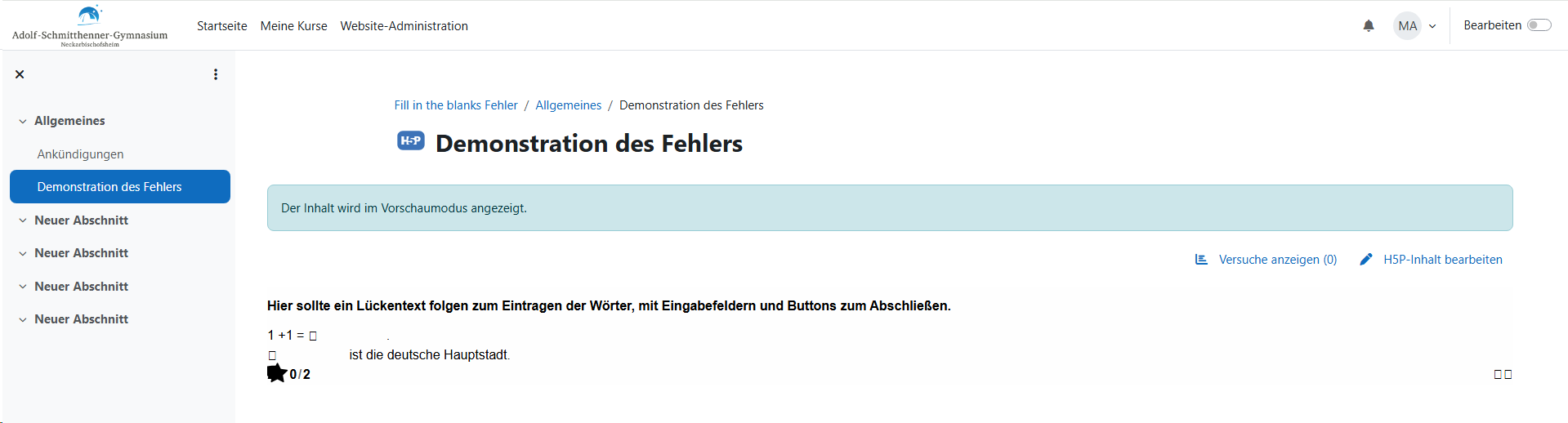
I am no expert, but the AI failed me in fixing the following problem. Can anyone help me? Thanks!
- In moodle 5.01, our fill in the blank activities used to be displayed fine, but after some updates in the summer, we no longer see fill in the blanks correctly. The buttons (like check) are displayed as tofu and the input boxes have vanished. The text is displayed normally and you can actually use it by clicking on the non existing blanks and the tofu-buttons. But it looks so bad that kids won't be able to use it.
- Desktop
- all browsers
- H5P-Framework v1.27 (h5plib_v127), fill in the blanks 1.14.37
H5P file:

Attachments:

Content types:

papi Jo
Fri, 09/11/2026 - 23:12
Permalink
hi!
H5P-Framework v1.27 (h5plib_v127), fill in the blanks 1.14.37
Won't work, that Fill in the Blanks version requires h5plib_v128.
Very important: you forgot to mention whether you are using the core Moodle h5p activity OR the external h5p plugin for Moodle!
otacke
Sat, 09/12/2026 - 08:15
Permalink
That's a problem caused by
That's a problem caused by H5P Group not bumping the minor versions of content types when they introduced the theming update.
If that's the reason, then opening the content in the editor and saving it should fix the problem. Could you try that?