Result page interrupts interactive video in the middle
Submitted by ntjkazm on Wed, 06/30/2021 - 10:31
Forums:
Dear team from H5P,
We created an interactive video with a couple of multiple choice tests in the middle and also choices, which let the user decide, which part of the video they like to jump to.
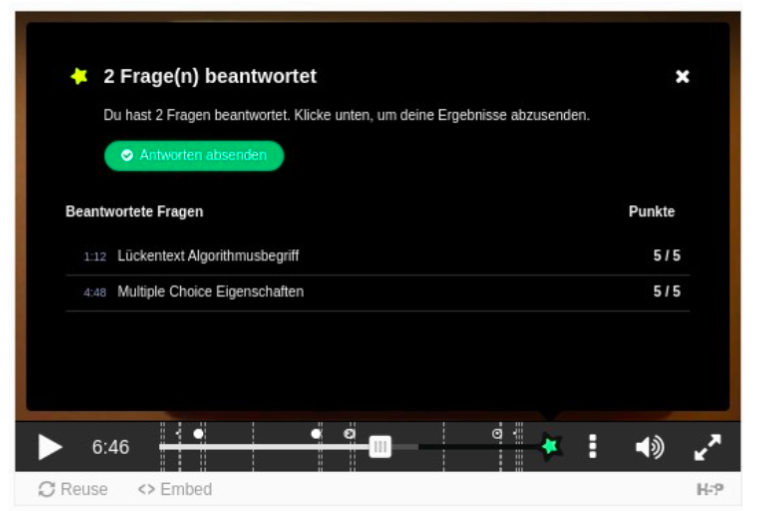
We have the problem that in the middle of the video it interrupts and there is a screen showing the summary of the questions so far answered.
How can we disable this screen or show it only in the end? Do we have fill out the last tab "Zusammenfassende Aufgabe" to accomplish that or is this a setting within the invidual interactive elements (multiple choice elements) we overlooked?
Attached is the H5P element we have the problem at 6:46min and also a picture showing the screen I'm referring to.
H5P file:

Attachments:

Content types:

BV52
Wed, 06/30/2021 - 19:17
Permalink
Hi ntjkazm,I suggest that you
Hi ntjkazm,
I suggest that you remove the submit screen at the middle of the video. You can check this short video for steps on how to add/remove submit screens in Interactive Video.
-BV
ntjkazm
Thu, 07/08/2021 - 12:38
Permalink
It worked, problem solved,
It worked, problem solved, thanks!
WIHealthyAging
Fri, 06/05/2026 - 17:29
Permalink
Follow-up
This is not working for me. I somehow have a submit page that was put at 3:00 in my video - but I can't figure out how to remove it. When I click on the green star - it only gives me options to add a submit screen, not to delete any (even if I add multiple screens in attempt to get it to register them).
See attached image.
How can i fix this?
BV52
Sat, 06/06/2026 - 01:33
Permalink
Hi WIHealthyAging,This is a
Hi WIHealthyAging,
This is a bug and has been reported to the Development team. We don't when they will release a fix for it.
-BV