unabletocopy on wordpress
Hello, team,
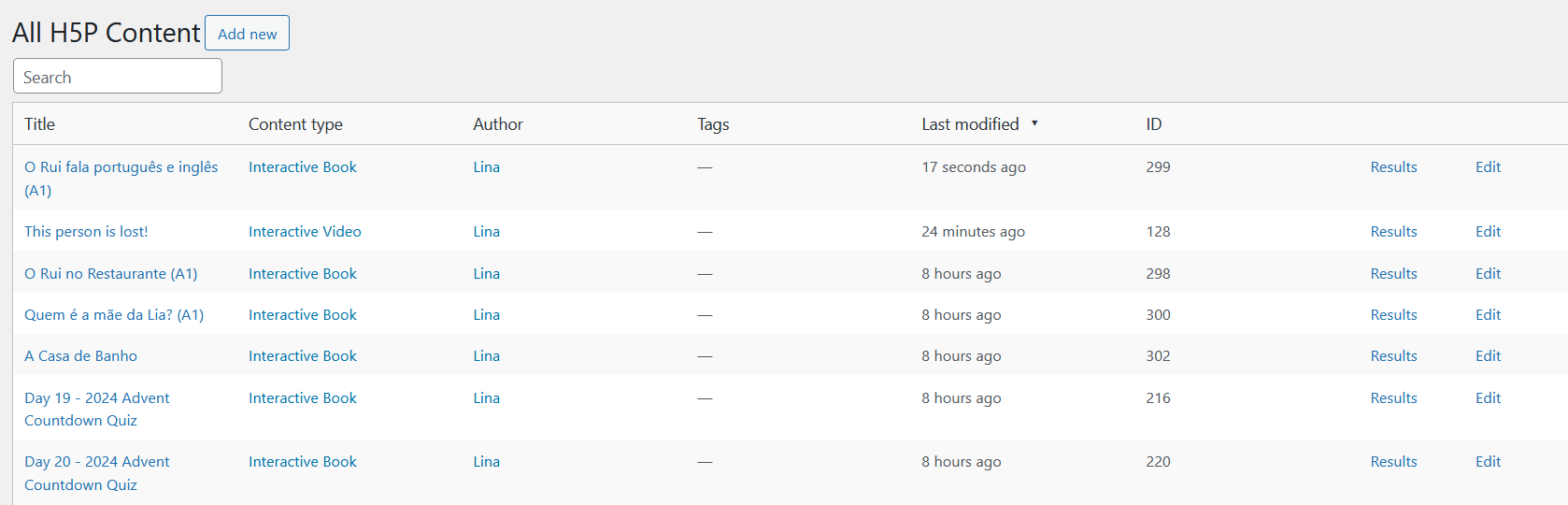
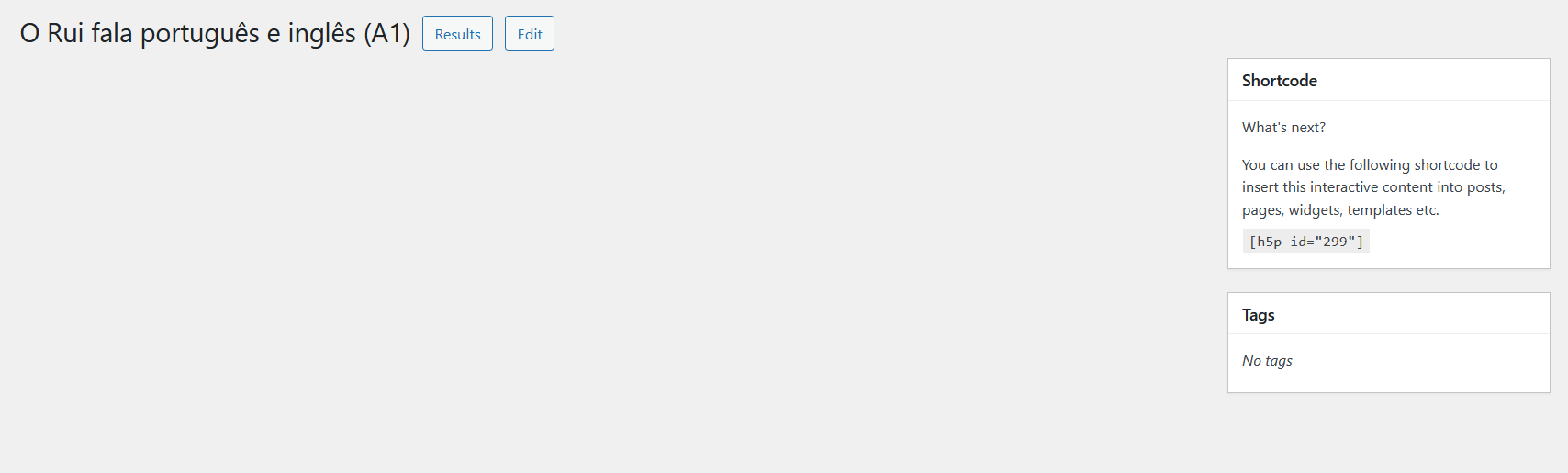
I have a huge problem! All my activities have stopped working and show blank on my website. I'm not sure when it started. I have updated all the libraries and installed all the updates, and it's still not working. I've attached screenshots of what I'm seeing.
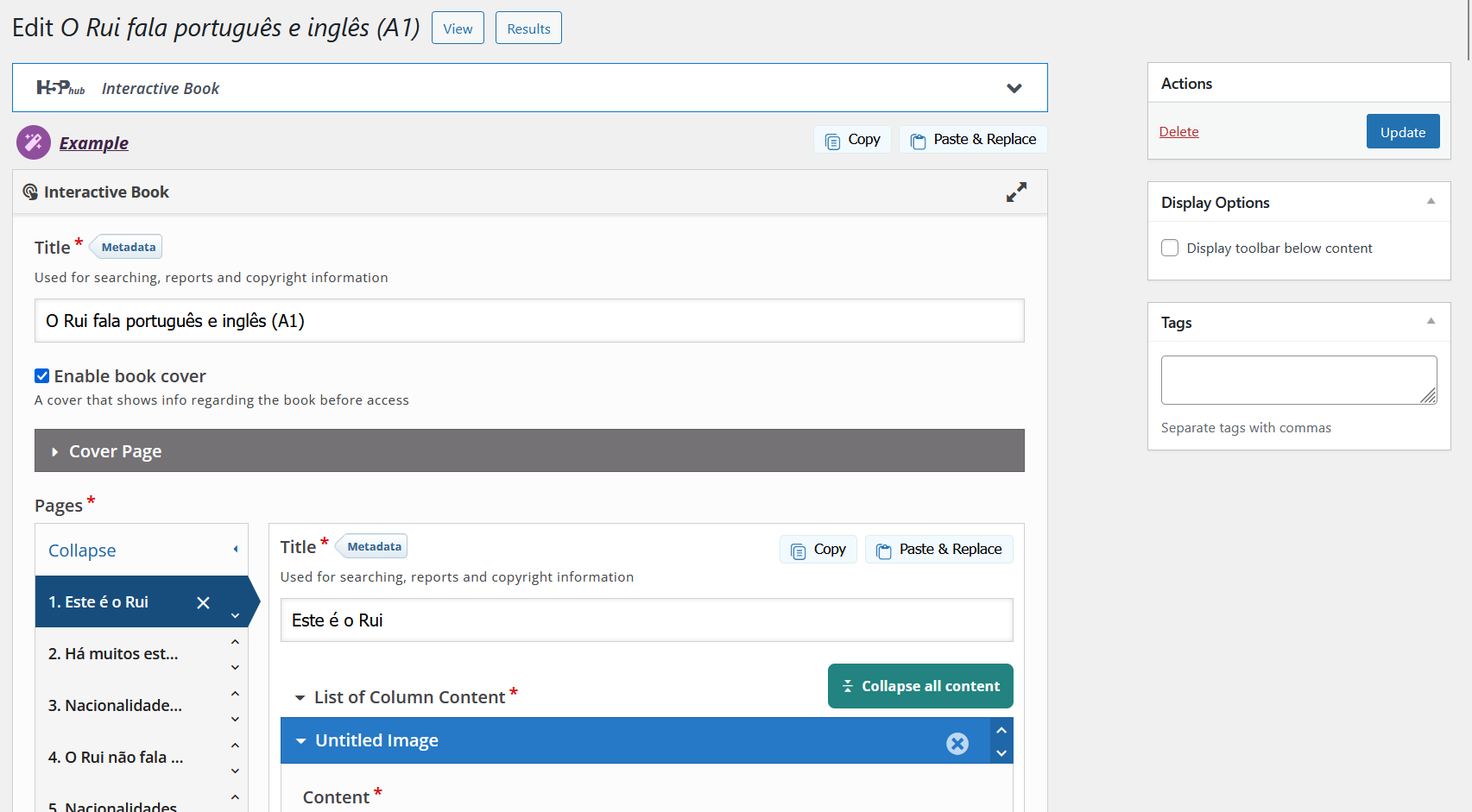
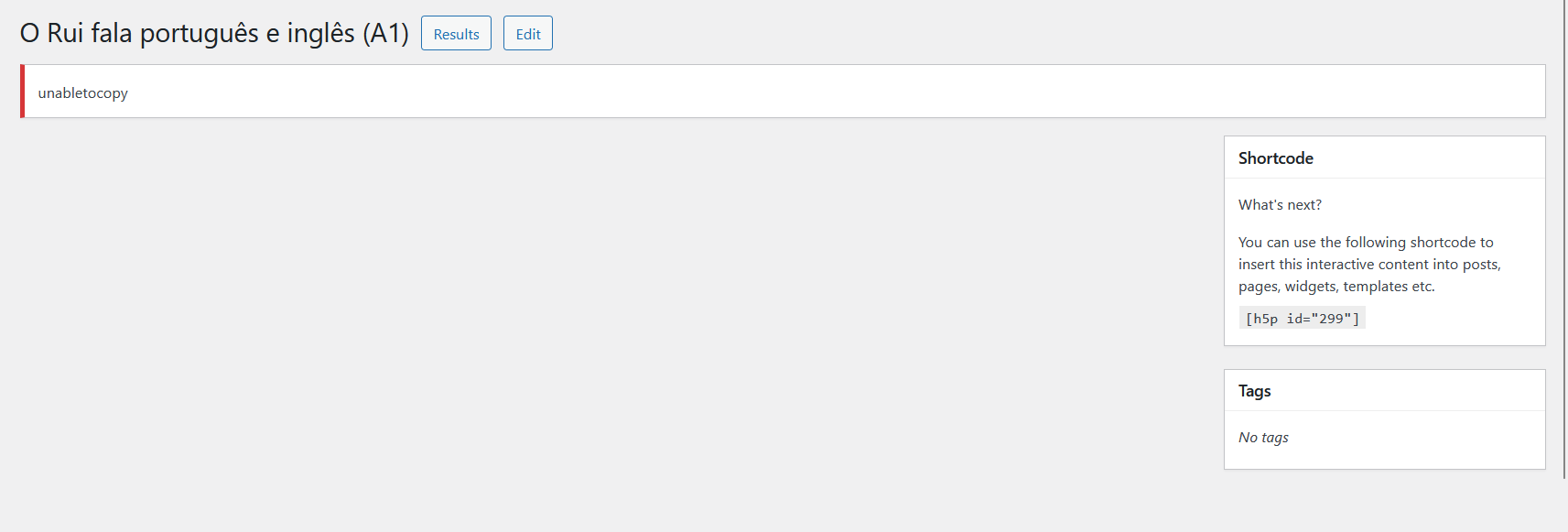
I can see the content in the h5p list, but when I click the title, it's blank. When I click edit, I'm able to see all the activities and content is there, I'm able to edit and make changes, but when I press update, it gives me the error "unabletocopy". If I click edit again, the changes have been made.
I'm using WordPress version 6.9.1;
It's happening on all browsers I've tried;
it's happening on mobile and desktop;
H5P plugin version 1.17.1;
All content types that I use, and I mostly use interactive book, single choice set, drag the words, drag the images, dialogues and accordion;
Forgive me, I don't know how to check the errors;
Screenshots are attached;
I removed the plugin Jetpack Boost recently and installed ShortPixel;
No changes to the browsers that I'm aware of;
Please help! How can I fix this?
Here is an example of post where I have an h5p activity and it's just blank where it says "test your comprehension" https://thesoundsofportuguese.com/quem-e-quem-patreon/
Thank you so much in advance.
Adelina


otacke
Fri, 02/27/2026 - 16:42
Permalink
I am sorry to hear that you
I am sorry to hear that you are running into trouble.
You're using plugin version 1.17.1 is most likely the answer. It's buggy and introduces folder paths that it has never used before. That then may cause trouble with copying folders which results in the "unabletocopy" message.
You will find some more information about this issue at https://chaos.social/@otacke/116137501176248197.
Please note that I don't know when H5P Group is going to fix this issue, as I am neither affiliated with or endorsed by H5P Group.
Cheers,
Oliver
BV52
Fri, 02/27/2026 - 17:29
Permalink
Hi All,I am checking with the
Hi All,
I am checking with the devs regarding the recent issues with the plugins. However, they are already on their weekends so I won't be able to provide any information until next week.
-BV
MarinaFL
Mon, 03/02/2026 - 17:52
Permalink
Hi!Have you got any replies
Hi!
Have you got any replies?
Thank you for your help.
MarinaFL
Mon, 03/02/2026 - 17:51
Permalink
Same here! How can I fix that?
I've been having the same issue with the wordpress h5p plugin!

otacke
Mon, 03/02/2026 - 23:09
Permalink
You're not alone. Please see
You're not alone. Please see https://chaos.social/@otacke/116137501176248197 for details and a workaround to fix this without the need to wait for H5P Group.
MarinaFL
Tue, 03/03/2026 - 01:23
Permalink
I have done it, did not work!
I have done it, did not work! Did it work to you?
otacke
Tue, 03/03/2026 - 07:17
Permalink
Patched the file, renamed
Patched the file, renamed folders, removed cache files, made sure the browser cache does not serve an old version?
Works perfectly fine, yes.
MarinaFL
Tue, 03/03/2026 - 21:37
Permalink
did not work in here!
did not work in here! the issue persists.
otacke
Fri, 03/06/2026 - 15:33
Permalink
H5P Group is working on a
H5P Group is working on a solution, but potentially, a tiny extra plugin may solve your troubles as well.
Sprechen-24
Tue, 03/03/2026 - 15:51
Permalink
Around 400 h5p files not usable
We are facing the exact same issue and can confirm that this is not an isolated case.
After updating, several core content types are now completely broken on our WordPress installation:
Page
Interactive Video
Course Presentation
Drag and Drop
Fill in the Blanks
They either show blank on the frontend or fail during update with errors like “unabletocopy”.
This affects around 400 H5P activities on our platform. At the moment, they are not usable at all, which is causing significant disruption and frustration among our users. We rely on H5P for active course delivery, so this is a critical issue for us.
Restoring a backup would only be a temporary workaround and not a real solution — especially since we would lose recent content changes and risk running into the same issue again with future updates.
Is there a reliable fix or repair procedure (e.g. filesystem permissions reset, library path correction, content re-save script, CLI repair, database adjustment, etc.) that allows us to restore functionality without rolling back the entire site?
BV52
Tue, 03/03/2026 - 18:27
Permalink
Hi All,A new version (1.17.2)
Hi All,
A new version (1.17.2) of the WP plugin has been release today, hopefully this resolves the ongoing issues. Please inform us if the issue persists.
-BV
MarinaFL
Tue, 03/03/2026 - 21:36
Permalink
I have just update and it persists!
I have just update to the version (1.17.2) of the WP plugin and it issues persist!
moxy
Wed, 03/04/2026 - 13:51
Permalink
Clean Install of WP plugin - can't connect
If it helps, after experiencing the same issues reported here, I just tried a completely clean install on a fresh site, but the plugin cannot connect:
No content types are available
mediabuild
Tue, 03/10/2026 - 00:27
Permalink
Does not work
Updated but the same issue persists.
otacke
Tue, 03/10/2026 - 09:23
Permalink
The plugin still has a bug.
The plugin still has a bug. The "H5PFixa" should help you while H5P Group works on another update.
mediabuild
Mon, 03/16/2026 - 08:49
Permalink
1.17.3 downloaded but still not working
I have updated to version 1.17.3, but unfortunately the issue is still persisting on my end.
What I find most difficult is that all the content I had built before this started was displaying correctly and working fine on my website. Now, none of it is visible on the frontend, and the H5P content list also appears empty. I do have a backup, but the thought of having to restore everything feels quite daunting.
I understand that H5P is used by a huge number of people around the world, and I imagine the team is working hard on a resolution. I would really appreciate any update on when a stable fix might be available. Thank you for your continued efforts.
otacke
Wed, 03/04/2026 - 08:31
Permalink
But if you did all of the
But if you did all of the above, the symptoms must have changed (thinking of messages in the network tab of the developer tools and the PHP error log, cmp. https://snordian.de/2024/02/17/how-can-i-craft-an-effective-bug-report-f...).
iLern
Thu, 03/05/2026 - 07:14
Permalink
1.17.2 did not improve the situation
I also installed update 1.17.1 and encountered the same issues described above. Updating to version 1.17.2 of the WP plugin did not resolve the issues.
Oliver's instructions helped solve the problem. Thank you very much.
otacke
Thu, 03/05/2026 - 08:34
Permalink
Unfortunately, if some things
Unfortunately, if some things got broken by 1.17.1, installing 1.17.2 will not fix those. Please cmp. https://h5p.org/node/1556879 for steps required to set things straight.
Sprechen-24
Thu, 03/05/2026 - 11:33
Permalink
H5P WP plugin update: many activities blank / manual re-save
We updated the plugin and also applied the suggested workaround, but the issue still persists on our side.
At the moment, it seems the release may not have been tested thoroughly enough for production use. A large number of our H5P activities are not visible to users anymore and only appear blank on the frontend.
For some content types, manually opening the content in the backend, editing it, and saving it again can restore visibility. However, this is not a practical or acceptable solution. The upgrade process should have handled such migrations automatically.
When you manage hundreds or even thousands of H5P files, manually reopening and re-saving each item is simply not feasible.
We understand that software issues can happen, especially in open-source projects, and we do appreciate the work behind H5P. But in a case like this, where so much production content is affected, we would really appreciate a proper repair solution that can be applied automatically rather than requiring manual fixes one by one.
Adelina83
Thu, 03/05/2026 - 20:40
Permalink
New error
Hi everyone, thank you so much for all your answers and comments. I've learned a lot. I'm sorry to hear that you are also experiencing these issues. But relieved as well that I'm not the only one. I've installed the updates, but it didn't solve anything for me. Before, I wasn't able to check the error in the console (because I didn't know how), but then I figured it out, and the error shown was unable to find constructor. I forgot to take a screenshot, but now, after the updates, I'm getting a different error (image attached).
Another thing that is different is that initially, the icons in the content list was not visible anymore for the content types that stoped working; it just said “interactive book icon” or "game map icon" but now some of those are showing again (image attached).
I'm reluctant to change the file names because I don't know what I'm doing, but I have located the folders in CP panel.
Any advice is appreciated. I will continue to wait for new updates. Adelina
Alex Espinoza
Thu, 03/05/2026 - 22:55
Permalink
Experiencing the same issue "unabletocopy"
Hi!
We have been using H5P for some time and it's a great plugin. Today, I updated the "Drag and Drop" library and it suddenly many of the quizzes stopped working,including 60 for flashcards and many more. It did happen after updating one type of quiz. Some of the "Drag and Drop" quizzes are still working, but many just won't load at all. Just like Sprechen-24 said, when you have a lot of content with h5p, this is real bad.
Adelina83
Fri, 03/06/2026 - 12:57
Permalink
New Error
Hi everyone, thank you so much for all your answers and comments. I've learned a lot. I'm sorry to hear that you are also experiencing these issues. Relieved as well that I'm not the only one. I've installed the updates but it didn't solve anything for me. Before, I wasn't able to check the error in the console (because I didn't know how), but then I figured it out, and the error shown was unable to find constructor. I forgot to take a screenshot, but now, after the updates, I'm getting a different error (image attached). Another thing that is different is that initially, the icons in the content type list were not visible anymore fort he content types theat stoped working. They just said “interactive book icon” but now many are is showing again (image attached).
I'm reluctant to change the file names because I don't know what I'm doing, but I have located the folders in CP panel. Any advice is appreciated. I will continue to wait for new updates.Adelina
otacke
Fri, 03/06/2026 - 17:07
Permalink
The "H5PFixa" might help you
The "H5PFixa" might help you while H5P Group works on their update.
kchoi
Fri, 03/06/2026 - 15:42
Permalink
H5P reply
Hi all,
Thanks for flagging these issues.
We are currently working hard on a resolution and appreciate your patience as we investigate further.
Kelly,
H5P Community Manager
kchoi
Fri, 03/06/2026 - 16:30
Permalink
More information required
Hi there,
Following my previous reply – Could you please provide a bit more detail for each issue? Specifically, it would help to know:
Steps to reproduce the problem – what actions lead up to the issue?
Expected vs. actual behaviour – what did you expect to happen, and what actually happened?
Environment details – browser, device, platform version, H5P plugin version, etc.
Any error messages or screenshots – these can be incredibly useful in diagnosing the issue.
Once we have these details, we’ll be better equipped to help troubleshoot or escalate as needed. Thanks in advance for your help and for being part of the community!
Adelina83
Fri, 03/06/2026 - 18:50
Permalink
Hi kchoi
Hi Kchoi, this is the sequence of events for me: After updating to H5P plugin version 1.17.1, a few of the content types I use stopped showing on the frontend - all anyone can see is a blank page. Here is an example - scroll down to "test your comprehension" - an interactive book is supposed to be there.
Another thing I noticed was that all the content types that stoped working properly weren't showing their icons anymore in the contents list - when you add a new content.
I can see my full list of created content but when I click on any of them it shows a blank page; I'm able to click edit and make changes; after clicking “update” I get the message “unabletocopy”; when I click edit again any recent alterations are there. but still blank on front end.
The initial error in console was "unable to find constructor".
Then I updated to 1.17.2 and there was also a library update for the interactive book, which I installed, but everything is the same (blank, unable to copr error), except now there is a different error in console, it says "Uncaught TypeError: can't access property "CoverPage", H5P.Components is undefined”
The other difference is the icons are back for some in the content list selection, but everything else is the same: blank on frontend and still getting “unabletocopy” when trying to save alterations to the content.
Screenshots are attached; I'm using WordPress version 6.9.1; It's happening on all browsers I've tried; it's happening on mobile and desktop;
I hope this helps! Adelina
otacke
Fri, 03/06/2026 - 20:19
Permalink
The "H5PFixa" might help you
The "H5PFixa" might help you while H5P Group works on their update.
Adelina83
Sat, 03/07/2026 - 09:56
Permalink
Hi Otacke
Hi Otacke, thank you for your message. I've installed this, and it works on Chrome and Android but not on Firefox.
Thank you for your help. Adelina
otacke
Sat, 03/07/2026 - 17:36
Permalink
The browser is irrelevant,
The browser is irrelevant, technically. The fix happens on the server-side only.
Have you cleared Firefox's cache as mentioned in https://h5p.org/comment/54687#comment-54687 and as H5PFixa hints to? It's possible that the browser still serves old, broken files from cache.
Cheers,
Oliver
Mymedschool.org
Mon, 03/09/2026 - 14:53
Permalink
H5P update causing broken activities and page layout issues on W
I am experiencing a very similar problem on my site, mymedschool.org, which contains about 3000 H5P activities.
The issue started after the first update. Some feature images broke, and several activities stopped working correctly. The Question Set activity was also affected, so I deleted the newly created question set and continued using the older version.
After the second update, the Question Set activity started showing the problems described earlier in this thread.
My setup:
WordPress
H5P plugin
LearnPress LMS
LearnPress allows me to place each H5P activity on a separate page. Since the update, many of those pages now have a distorted layout with a grey background.
Another strange behavior: on pages where a Question Set is embedded, another H5P activity on the same page does not appear at all. However, if I replace the Question Set at the bottom with another H5P activity type, the non-graded activity on the page loads correctly along with the graded one.
So it seems the Question Set activity may be interfering with other H5P content or the page layout.
Has anyone else seen this behavior or found a workaround?
otacke
Mon, 03/09/2026 - 20:42
Permalink
Have you actually read this
Have you actually read this thread? A solution is proposed there + H5P Group is working on an official update to fix the problem.
mediabuild
Tue, 03/10/2026 - 00:14
Permalink
I am also having the same problem.
I really hope this problem gets resolved soon because I am working on a project that is due May. I need so many chapters to build... For me, question set and documentation tool does not work!
otacke
Tue, 03/10/2026 - 09:24
Permalink
The "H5PFixa" might help you
The "H5PFixa" might help you while H5P Group works on their update.
mediabuild
Tue, 03/10/2026 - 22:49
Permalink
Hi
Hi thank you so much. I am just afraid that there might be some compatibility issues as you warned: "ENSURE THAT YOU HAVE A BACKUP OF YOUR FILESYSTEM AND OF YOUR DATABASE AND THAT YOU CAN USE IT TO RESTORE THINGS! THIS SHOULD WORK FINE, BUT YOU WILL BE USING THE SOFTWARE AT YOUR OWN RISK." So I might wait for h5p team to come up with a new update soon. Thank you so much though!
otacke
Wed, 03/11/2026 - 01:32
Permalink
This is not a warning because
This is not a warning because I am not confident it will work. It is a general warning that people ignore too often before installing or updating something: Always have a backup and know that you can restore it.
H5P Group also will not give you any kind of guarantee that nothing will fail when using their software/upgrades - you're experiencing this right now, right? I am just up front about it.
The decision is yours.
mediabuild
Fri, 03/13/2026 - 09:41
Permalink
Oh I see, then what should I backup?
I have back up h5p files, but do I have to back up all the whole wordpress? Or would just having h5p backup files would suffice?
Thank you.
Mymedschool.org
Wed, 03/11/2026 - 18:15
Permalink
First Update on H5P 1.17.3 – Ongoing Issues Persist
I recently updated to H5P version 1.17.3, hoping it would resolve some long-standing issues with activities on my site. Unfortunately, there are no noticeable improvements. The problems that have been plaguing H5P for months remain:
Activities still fail to load properly – most of the content doesn’t appear on pages.
Feature images for certain add-ons are still broken( See images), suggesting these are likely not properly connected to the H5P Hub.
Copy and reuse functionality doesn’t work – the “copy” sign remains unresponsive.
Questions are invisible until the activity is edited, making it hard to review or use the content directly.
After editing, activities often fail to appear on the page, breaking the workflow.
If a non-functional activity exists on a page, it prevents other H5P content on the same page from working.
Currently, there is no known workaround for these issues that reliably restores full functionality. This update, like the previous few, seems to have no impact on real-world usability, leaving H5P users stuck with broken activities.
It’s clear that a more robust fix is needed, ideally addressing connectivity with H5P Hub, activity rendering, and copy/paste functionality. Until then, many sites running multiple H5P activities will continue to encounter serious workflow interruptions.
otacke
Wed, 03/11/2026 - 23:20
Permalink
Hi!If you have a closer look
Hi!
If you have a closer look at this thread, you will notice that a workaround is available. It should fix most of the issues that you mention as they are related.
Regarding not being able to paste content: Please read https://snordian.de/2024/10/30/why-should-i-upgrade-existing-h5p-content...
otacke
Fri, 03/13/2026 - 19:33
Permalink
What did all the capital
What did all the capital letters say? :-D Essentially, the files are enough, but it will besimpler to restore things if you have a full backup of the site.
otacke
Mon, 03/16/2026 - 10:23
Permalink
1.17.3 fixes issues for new
1.17.3 fixes issues for new setups that could not connect to the Hub, but does not touch the database entries.
Upcoming 1.17.4 is supposed to fix the remaining problems.
H5PFixa fixes these today. And 1.17.4 is using the same code that H5PFixa uses, by the way.
Mymedschool.org
Tue, 03/17/2026 - 23:47
Permalink
Issue with Question Set causing page shrink and grey background
Hi everyone,
After the recent H5P update, it looks like many of the previous issues have been resolved—great work by the team!
However, I’m still experiencing a problem, and I’m not sure if it’s specific to my setup.
I’m using WordPress with the LearnPress LMS plugin. LearnPress allows adding graded H5P activities at the bottom of lessons, which works fine for most content types (e.g., interactive videos, MCQs, etc.).
The issue occurs specifically when I add an H5P Question Set:
The page dimensions shrink unexpectedly
A grey background appears around the activity
The layout looks constrained compared to other H5P content types
Other H5P activities display normally within the same lesson, so the issue seems isolated to Question Set.
What I’ve checked so far:
Other H5P content types work correctly
The issue occurs consistently with the Question Set only
Happens within LearnPress H5p integration
Questions:
Has anyone else experienced this with Question Set?
Could this be related to iframe/container sizing or CSS conflicts?
Any known compatibility issues between LearnPress and Question Set after the latest update?
Any suggestions or guidance would be greatly appreciated!
Thanks in advance.
Mymedschool.org
Fri, 03/27/2026 - 00:01
Permalink
H5P Update: Progress Made, But Key Issues Still Persist
H5P Update: Progress Made, But Key Issues Still Persist
The recent H5P update, along with a few follow-up fixes, has definitely moved things in the right direction. Many of the previously reported issues now seem to be resolved, and overall stability has improved. Content loads more reliably, and several activity types are functioning as expected again.
However, despite these improvements, a few critical problems are still affecting usability—particularly with Question Sets and Flashcards.
What’s Working Better
After the update:
This shows that the update addressed several underlying issues, which is encouraging.
Ongoing Issues
1. Question Set ProblemsThe Question Set content type is still causing major issues:
This issue appears inconsistent, which makes it harder to debug and rely on for teaching.
2. Flashcards Not DisplayingAnother significant issue is with Flashcards: